
WinWay TradingExpert Pro with Dial/Data $1 first month
The 'DOWNLOAD NOW' button is below but please read the following before you click on it
On behalf of all the staff at WinWay, we would like to thank you for trying the WinWay TradingExpert Pro software…. And you will soon get to see that WinWay TradingExpert End of Day is different from the rest!
What is different about WinWay Trading Expert Pro?
It does things that other software just can’t do and in ways that make it easier for you to do the analysis you need to find the right trades for your trading strategy… with minimum effort.
Why is it different?
With the rise in popularity of small applications (applets) for tablets and smartphones where the processing takes place on the providers’ servers, developers have been flocking to comply with the hardware suppliers’ ever-increasing demand for less processing to be carried out on the end user’s terminal to make more installations possible and to maximise their content revenues.
WinWay is not a volume provider of applications and depends not on ease of installation or on being able to run on any tablet or phone. Its clients are serious about what they do and want a tool that gives them an edge over others in the market; one which they can adapt to their way of looking at the markets and one which they can rely on for its consistency of presentation, performance, and reliability; one which resides on their PC and not in some far-away server; and which can even be used in many circumstances while offline. They simply want what’s best for them.
So what does this mean for me?
This means we occasionally have to do a bit of work to unravel the protection that the computer manufacturers and anti-virus software providers often put into their products to ease the installation of applets and make life more difficult for real applications to be installed. But once installed your service will purr away on its own without being disturbed by the firewalls and protection software…and don’t worry if you have an aggressive firewall installed or have a problem installing as we will be with you every step of the way.
With today’s busy schedules, we know that many people have only a limited amount of time to become familiar with new software. To help you get up to speed with your new trading software we’ve included helpful tips and hints, expert articles, and useful links and information to all our new clients.
Please follow the steps below to install your $1 trial with data.
Support +44-207-647-7000 Mon-Fri 08:00-5:00pm UK
E-mail support@winwaycharts.com
1. Downloading the install and installing the software if you haven’t already done so
2. Running the software
3. What do I do next?
4. When will I get my Dial/Data credentials to download data?
5. How do I make my WinWay look like Darren’s?
1. Downloading and installing the software– Click on the download now button to begin the WinWay TradingExpert Pro download process required for your Dial/Data service (if you already have the software installed please go to step #2). The download will begin shortly.
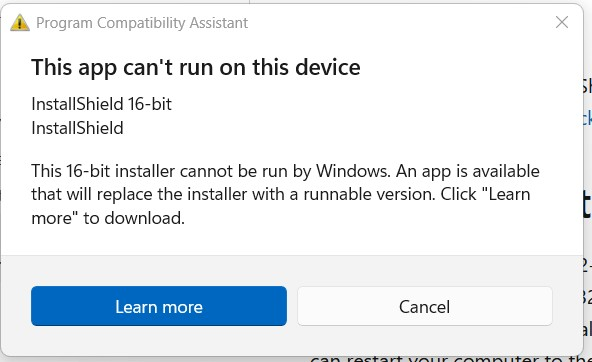
– In Microsoft Edge we suggest you save the file to your system – In Google Chrome the file saves automatically – In Firefox select save – Locate the install file WinWayTradingExpertProDD255.exe, it will be in your downloads folder, or you can search for the file name – Once located, if it is not already there, Cut and Paste the file to your Desktop. Then Right-click on the file name and select ‘Run as Administrator’ – If prompted ‘Do you want the following program from an unknown publisher to make changes to this computer’ click Yes – The installation process includes all the WinWay TradingExpert Pro files and data you need for the trial. The installation will begin once the file has been unpacked. Support QuestionsInstallshield Error If you get this error, click on Cancel. Then, click this link to install the runnable version, it’s very quick.
The Request Operation Requires Elevation Right-click on the TradingExpertPro96AIQ.exe in your downloads folder and select ‘Run as Administrator’ |
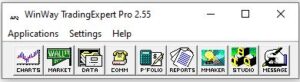
2. Running the softwarea) Open the program from the red AIQ Icon on your Desktop or through the Main Menu icon on your WinWay TradingExpert Pro program group from your Windows Start button and this menu will appear. We suggest you start with the Charts icon.
|

3. What do I do next?
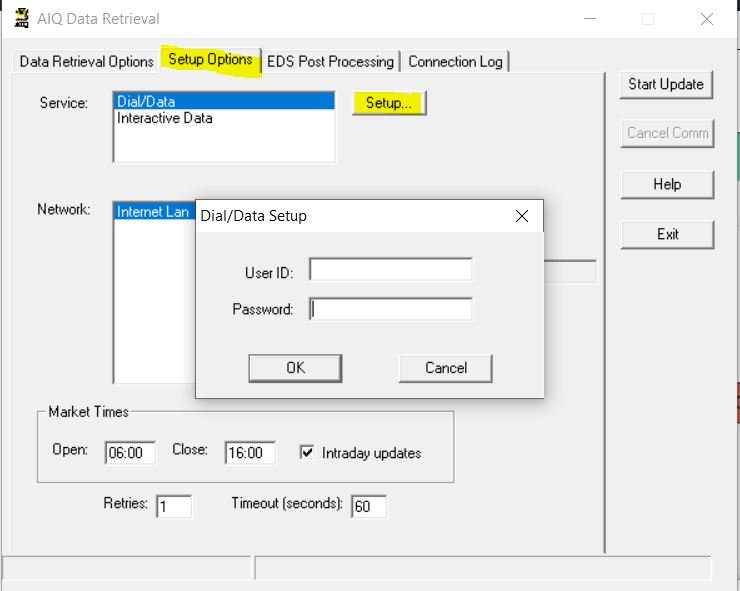
4. When will I get my Dial/Data credentials to download dataYour credentials will be e-mailed to you in 24 – 48 hours from dialdata@winwaycharts.com These credentials will give you access to Dial/Data end-of-day data so you can use all the functionality of Darren’s favorite software with current pricing downloaded every evening. The e-mail will include instructions on how to enter these credentials into the Data retrieval module. The instructions are also included below. 1. Launch the WinWayCharts Main Menu icon from your WinWay TradingExpert Pro program folder or desktop icon. 2. Select the Comm icon. 3. Click on the Setup Options tab and then on the Setup button adjacent to Service Dial/Data
4. Enter your user ID and password from the credentials e-mail and click OK. You are now ready to download data from Dial/Data by clicking the Start update button on the Data Retrieval tab. If you elected to receive intraday snapshot you’ll automatically be able to access this download during market hours. End-of-day closing data is usually available after 8pm Eastern each market day. 5. How do I make my WinWay look like Darren’s?This video shows you how to set up your WinWay TradingExpert Pro charts to look just like Darren Winters’ Charts. |
 English